
How to fix a 403 when scraping
Proxy Compare requested the front page and robots.txt of ten large sites on 28 Aug 2026 from a residential connection, then repeated every refusal with a python-urllib user agent. A 403 is several different failures wearing one status code, and which one you have decides what helps.
3 Sept 2026 · 8 min read
Point in time. The figures below were read on 28 Aug 2026 and are not updated after publication. For current numbers see the comparison table.
On this page (9)
- 1Step 1: read who refused you
- 2Step 2: if there is no bot manager, try the user agent
- 3Step 3: when a header will not help
- 4Sampling more than once
- 5Step 4: check whether you need a proxy at all
- 6What robots.txt will and will not tell you
- 7The status code that is neither
- 8The check, as a script
- 9Limitations
A 403 means the server understood your request and refused it. In a scraping context that refusal comes from one of two very different places, and they are indistinguishable from the status code alone.
Either the site itself turned you away because your client announced what it was, which is a one-header fix. Or a bot-management product sitting in front of the site made the decision, in which case it is reading your TLS handshake, your header order and your address, and no single header will change its mind.
The standard advice, set a user agent and buy proxies, fixes exactly one of those. Which is why the first step is not to change anything.
Find out which you have before changing anything. It takes one request and it is written in the response.
Step 1: read who refused you
Look at the Server header and the Set-Cookie line, not the status code.
When we asked ten large sites for their front page, two refused, and neither refusal came from the site itself:
indeed.com   403   Server: cloudflare     Set-Cookie: __cf_bm=...   CF-RAY: ...
                   page title: "security check - indeed.com"

ebay.com     403   Server: AkamaiGHost    Set-Cookie: bm_s=...
                   page title: "error page | ebay"
The cookie is the tell. __cf_bm is Cloudflare Bot Management, bm_s is
Akamai Bot Manager. A 403 that arrives with one of those is a bot-management
decision, and that tells you the class of problem before you touch a header.
A 403 with no such cookie, from the origin's own server, is usually the simpler case below.
Do not read the page copy for this. Here is what eBay actually returned:
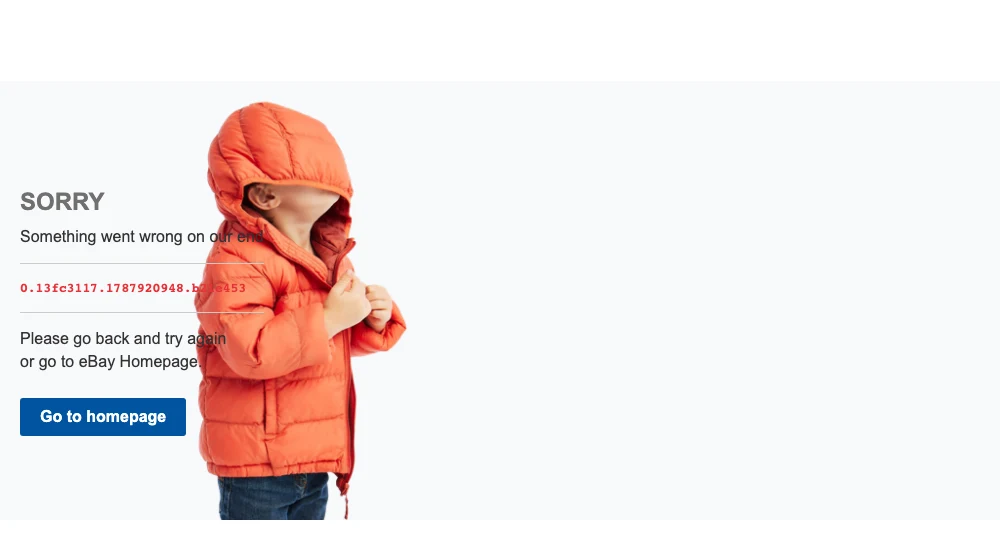
It is dressed as a server fault. "Something went wrong on our end" is what a 500 says, and there is nothing on the page about automation, rate limits or bot detection. The red monospace string is an Akamai trace reference and is the only part their support will care about.
The status code and the cookie told the truth. The copy did not.
Step 2: if there is no bot manager, try the user agent
This is the advice everyone gives, and on the right failure it works completely.
Wikipedia refuses requests with its default user agent, which announces the
library:
| Request | Response |
|---|---|
requests, default user agent | 403, 126 characters |
requests, Chrome 151 user agent | 200, 239,671 characters |
headers = {"User-Agent": "Mozilla/5.0 (Macintosh; Intel Mac OS X 10_15_7) "
                         "AppleWebKit/537.36 (KHTML, like Gecko) "
                         "Chrome/151.0.0.0 Safari/537.36"}
r = requests.get(url, headers=headers)
One header, complete reversal.
Step 3: when a header will not help
We repeated both bot-managed refusals with a python-urllib user agent instead
of Chrome:
| Site | Chrome UA | python-urllib UA |
|---|---|---|
| indeed.com | 403 | 403 |
| ebay.com | 403 | 403 |
Byte counts barely moved. A bot-management product is reading TLS fingerprint, header order, and browser signals, and one string is not the thing it is deciding on.
What changes the picture there is the whole client, not one field. The browser
signals these products can read are the ones we measured across
seven anti-detect tools, and a
tool like curl_cffi with impersonate="chrome" exists to match a real
browser's TLS handshake rather than only its user-agent string. It is also the
cheapest thing to run, at
an eighth of a browser's bandwidth.
Sampling more than once
We went back and repeated the identical request eight times against each, and the two sites turned out to be doing different things:
| Site | 403 | 200 | Refusal |
|---|---|---|---|
| ebay.com | 8 | 0 | deterministic |
| indeed.com | 5 | 3 | intermittent |
eBay refused all eight, at about 1,830 bytes each. indeed.com refused five and served the real 600 KB page the other three, from the same address with the same headers, seconds apart.
Our own first pass got this wrong. One request made indeed.com look like a stable wall when it is closer to a weighted coin, and that difference decides your retry strategy: against eBay a retry is wasted bandwidth, against indeed.com it is most of the fix.
So sample before concluding, in both directions. A single request understates a rate limiter and overstates a probabilistic blocker.
Step 4: check whether you need a proxy at all
Uncomfortable for a proxy comparison site to say plainly: seven of these ten sites served an ordinary request from an ordinary connection, with no proxy.
If access is the only reason you want one, the check is one request. Where a proxy does change things is rate limiting and address reputation, which need volume to show up and which a single request cannot tell you about.
Where an address is genuinely the problem, what per-gigabyte pricing looks like across the market is on the residential proxy page with the date each figure was read. We rank on published price and measured behaviour, and no affiliate relationship enters a sort.
What robots.txt will and will not tell you
Not this. We checked, and the relationship is inverted:
| Site | robots.txt disallows all for * | Front page |
|---|---|---|
| linkedin.com | yes | 200 |
| x.com | yes | 200 |
| indeed.com | no | 403 on 5 of 8 |
| ebay.com | no | 403 on 8 of 8 |
| amazon.com | no | 202 |
robots.txt is a policy statement from whoever owns the crawling relationship. A
403 is an engineering decision by a product in front of the origin. Different
teams, different purposes, no obligation to agree.
That does not make the policy irrelevant. LinkedIn's file is explicit:
# Notice: The use of robots or other automated means to access LinkedIn without
# the express permission of LinkedIn is strictly prohibited.
It also publishes a route to ask, which almost nothing else does:
whitelist-crawl@linkedin.com. Being served a 200 is not permission, and the
terms of use are the document governing whether you may, not the status code.
The status code that is neither
Amazon never returned 200 to us at all:
| User agent | Response |
|---|---|
| Chrome 151 | 202, 2,007 bytes |
python-urllib/3.14 | 503, 2,671 bytes |
A 202 is "accepted", and two kilobytes is not a front page. If you are branching
on status == 403 you will miss this shape entirely, so branch on "did I get the
content I expected" instead.
The check, as a script
Everything above is one request and three fields off the response. This prints the verdict for any URL:
import requests

UA = ("Mozilla/5.0 (Macintosh; Intel Mac OS X 10_15_7) AppleWebKit/537.36 "
      "(KHTML, like Gecko) Chrome/151.0.0.0 Safari/537.36")

BOT_COOKIES = {
    "__cf_bm":   "Cloudflare Bot Management",
    "bm_s":      "Akamai Bot Manager",
    "bm_sv":     "Akamai Bot Manager",
    "datadome":  "DataDome",
    "_px":       "PerimeterX",
}

def diagnose(url):
    r = requests.get(url, headers={"User-Agent": UA}, timeout=20)
    server = r.headers.get("server", "")
    cookies = "; ".join(r.cookies.keys())

    hit = next((v for k, v in BOT_COOKIES.items()
                if any(c.startswith(k) for c in r.cookies.keys())), None)

    print(f"{url}\n  status {r.status_code}  server {server}  bytes {len(r.content):,}")
    if hit:
        print(f"  -> bot manager: {hit}. A user agent will not fix this.")
    elif r.status_code == 403:
        print("  -> refused with no bot-manager cookie. Try the user agent first.")
    elif r.status_code != 200:
        print(f"  -> neither served nor refused. Branch on content, not on 403.")
    else:
        print("  -> served. No access problem to solve from this address.")

for site in ["https://www.indeed.com/", "https://www.ebay.com/",
             "https://www.amazon.com/", "https://en.wikipedia.org/"]:
    diagnose(site)
Against those four sites it prints:
https://www.indeed.com/
  status 403  server cloudflare  bytes 27,645
  -> bot manager: Cloudflare Bot Management. A user agent will not fix this.
https://www.ebay.com/
  status 403  server AkamaiGHost  bytes 1,831
  -> bot manager: Akamai Bot Manager. A user agent will not fix this.
https://www.amazon.com/
  status 202  server CloudFront  bytes 0
  -> neither served nor refused. Branch on content, not on 403.
https://en.wikipedia.org/
  status 200  server mw-web.eqiad.main-c7c945899-5f6lw  bytes 261,384
  -> served. No access problem to solve from this address.
Two of those numbers differ from the table earlier: that one was measured with
urllib and this run uses requests, which handles redirects and compression
differently. Amazon
returning 202 with a zero-length body here rather than 2,007 bytes is the same
refusal wearing different clothes, and it is a good argument for branching on
content rather than on a status code or a size.
The proxy behind it is the recurring cost, and per-gigabyte prices vary more between providers than these tools vary between each other. What each charges, with the date it was read, is on the provider table.
Limitations
One address, one day. The ten-site sweep was a single request each; only indeed.com and ebay.com were sampled eight times, and that sample is what uncovered the difference between them.
A small sample errs in both directions. It understates a rate limiter, because per-path rules and address reputation need volume to appear and we generated none. And it overstates a probabilistic blocker: one request had indeed.com filed as a wall when it refuses roughly three times in five. Eight requests is enough to separate deterministic from intermittent and not enough to characterise either.
We did not scrape any of these sites, fetched nothing beyond the front page and robots.txt, and make no claim about behaviour under load. We did not test whether a proxy clears the two bot-managed refusals, because doing that honestly needs many addresses across many providers.
Nothing here is legal advice about whether you may scrape a given site.
Sources
- LinkedIn robots.txt LinkedIn, read 28 Aug 2026
# Notice: The use of robots or other automated means to access LinkedIn without the express permission of LinkedIn is strictly prohibited.
Questions
Why am I getting 403 when web scraping?
Two different causes that look identical. Either the site refused your client's default identity, which one header fixes, or a bot-management product refused the connection, which it does not. The response tells you which: a bot manager sets a cookie with the refusal.
Does changing the user agent fix a 403?
Sometimes completely and sometimes not at all. Wikipedia refused python-requests' default user agent and served the page immediately with a Chrome one. Two sites refusing us through Cloudflare and Akamai returned 403 to both, with the byte counts barely moving.
Does robots.txt tell me whether a site will block me?
Not in our reading, and the relationship was inverted. Of ten sites, the two that disallow everything for a generic crawler both served their front page, and the two that returned 403 both permit crawling. They are different documents written by different teams.
Do I need a proxy to fix a 403?
Not necessarily, and it is worth checking before buying. Seven of the ten sites we tried served a plain request from an ordinary connection. Where a bot manager is refusing you, an address change is one input among several it reads, so it is not automatic there either.
Does a 200 mean a site allows scraping?
No. It means one request from one address was served. LinkedIn and X both served us while stating in robots.txt that automated access is disallowed, and LinkedIn's file calls it strictly prohibited. Whether you may is a separate question from whether you can, and the terms of use govern it.