
How to choose an anti-detect browser
Proxy Compare ran seven anti-detect and stealth browser tools headless against the same page on one machine on 1 Sep 2026, reading back navigator.webdriver, the user agent, window.chrome, navigator.plugins.length and navigator.platform from each. Two of the seven do not run and one contradicts itself.
29 Aug 2026 · 14 min read
Point in time. The figures below were read on 1 Sept 2026 and are not updated after publication. For current numbers see the comparison table.
On this page (14)
- 1What an anti-detect browser is for
- 2Three tools, three different browsers
- 3What the page sees
- 4What actually separates them
- 5One of the two clean ones contradicts itself
- 6Which leaves one that gets all four right
- 7What people actually run these for
- 8Libraries against desktop applications
- 9The complaint every one of these tools shares
- 10Maintenance is a selection criterion, and the download numbers ignore it
- 11Setting a proxy in each
- 12The desktop applications
- 13Reading the signals yourself
- 14Limitations
What an anti-detect browser is for
A browser tells every page it loads a great deal about itself: its user agent, its platform, its screen size, its fonts, its plugins, how many CPU cores it has, how its graphics stack renders a test image. Taken together those values are close to unique, which means a site can recognise the same browser across visits without a cookie, and can tell an automated one from a person's.
An anti-detect browser exists to control that surface. Some change what the browser reports so it looks like an ordinary one; others keep several separate, consistent identities so that accounts run from one machine do not resolve to the same fingerprint.
There are two very different products under that name, and picking between them is the first decision.
Code libraries you import and control from a script, for scraping at volume. That is the seven measured below.
Commercial desktop applications you log into, which manage many saved profiles each with its own fingerprint and proxy. Those are for running multiple accounts by hand, and they are covered further down.
Every guide to the first group is written either by the project about itself or by a company selling proxies alongside it, so we ran all seven against the same page and read back what a site can see.
Almost all of them fix the same signal, and most ignore the one a site checks first.
Three tools, three different browsers
The first thing to know when picking one is what you are actually launching. Same site, same window size, three tools:
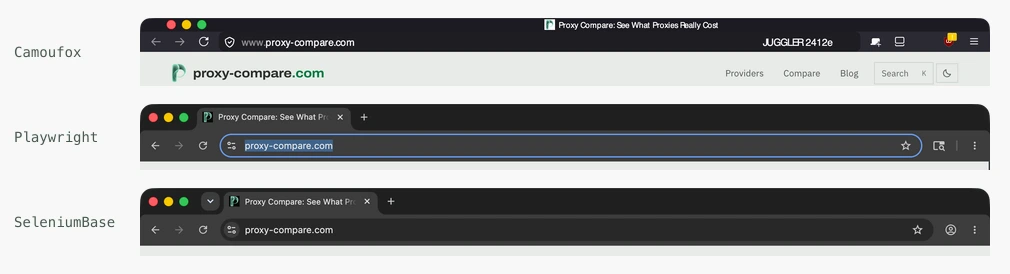
macOS names the owning application for each, and they are three different programs:
| Tool | Window belongs to |
|---|---|
| Camoufox | Camoufox, a Firefox build |
| Playwright, Patchright | Google Chrome for Testing, a bundled Chromium |
| SeleniumBase | Google Chrome, the browser you installed |
That distinction predicts most of the table below. A tool driving your real Chrome starts with properties a bundled Chromium does not have, so it has less to spoof; a Firefox build has a different fingerprint surface entirely and cannot be compared property for property.
What the page sees
Every tool below loaded the same page, headless, on the same machine, and we read back the four properties any site can check in a line of JavaScript.
| Tool | Version | navigator.webdriver | User agent | window.chrome | Plugins |
|---|---|---|---|---|---|
| Playwright, no stealth | 1.60.0 | true | HeadlessChrome | undefined | 0 |
| Patchright, default | 1.62.2 | false | HeadlessChrome | undefined | 0 |
Patchright, channel="chrome" | 1.62.2 | false | HeadlessChrome | object | 5 |
| nodriver | 0.50.3 | false | HeadlessChrome | object | 5 |
| undetected-chromedriver | 3.5.5 | false | HeadlessChrome | object | 5 |
| playwright-stealth | 2.0.3 | false | Chrome | object | 3 |
SeleniumBase, uc=True | 4.53.4 | false | Chrome | object | 5 |
| Camoufox | 0.5.5 | false | Firefox | n/a | 5 |
Bold is the value a real browser would not give. Read on 1 September 2026, on Python 3.14.7 on macOS 26.3, against Chrome 152 where the tool drives installed Chrome, and each tool's own bundled Chromium where it does not.
The version column is the important one and it will date fastest. Patchright ships most weeks and its own issue tracker carries titles like "regression: Google captcha appears on 1.61.1, works fine on 1.60.0". A table like this is a snapshot, not a ranking, and the check that produced it is four lines of JavaScript you can re-run in a minute against whatever you have installed.
And it answers a narrower question than the one you probably have. This is what each tool tells a page about itself. It is not whether any particular site will let you through, which depends on that site's detector, your address and your request pattern, and which no table can tell you. A tool can report all four values correctly and still get blocked; the section on Docker below is mostly about why.
Camoufox is the row that does not belong in the column. It is a Firefox
build, and a real Firefox has no window.chrome object at all, so undefined
there is correct for it and a tell for every Chromium tool above it. Comparing
the two engines property by property flatters whichever one you were already
going to pick. What it does share is a clean user agent and a self-consistent
platform, and on the run above it claimed to be Windows.
What actually separates them
navigator.webdriver is the property everyone knows about, and that is exactly
why it stops being useful. Six of the seven set it to false. Only plain
Playwright leaves it true, which makes it a control rather than a contender. If a
tool's pitch is that it clears the webdriver flag, it is describing the minimum.
The user agent is the column that actually sorts them. Five of seven still
announce HeadlessChrome. That string
is the cheapest check a site can run: no fingerprinting library, no heuristics,
one substring match on a header you send unprompted.
Only two produce a clean user agent, and that is the real dividing line in this table. Everything else is close to a tie.
If you take one thing from this comparison, take that the property most tools fix is the one least worth fixing, and the one most of them ignore is the one a site checks first.
One of the two clean ones contradicts itself
playwright-stealth gets the user agent right and then reports two different operating systems in the same call:
navigator.userAgent            ... Macintosh; Intel Mac OS X 10_15_7 ...
navigator.userAgentData.platform   macOS
navigator.platform             Win32
A real machine cannot answer that pair two ways. A Mac reports MacIntel; a
Windows machine does not send a Macintosh user agent. Catching it needs an
equality check between two properties, which is cheaper than anything else on
this page.
navigator.platform is deprecated, and that is why it matters. Every modern
guide tells you to read navigator.userAgentData instead, so a stealth patch
written against the modern API has no reason to remember the old one, and a
detector written five years ago has no reason to stop reading it. Deprecated
means nobody is looking at it except the people looking for you.
Which leaves one that gets all four right
SeleniumBase with uc=True is the only tool in the table with a clean user
agent, a cleared webdriver flag, a real window.chrome, a non-empty plugin list,
and a platform that agrees with itself.
Its cost is start-up time: turning UC mode on took our launch from 1.4 seconds to 10.4. That matters enormously or not at all depending on your shape. One long-lived browser working a queue pays it once; a worker that starts a fresh browser per job pays it every time, and at ten thousand jobs that is twenty-five hours of launching.
What people actually run these for
The signal table says what each tool reports. It does not say who reaches for which, so we went and read the places practitioners talk: GitHub issue trackers, Hacker News, Stack Overflow.
SeleniumBase ships around 130 example scripts named after their target site, added in response to user requests, which makes the directory an accidental catalogue of demand. The jobs in it are ordinary commerce: retail price monitoring (Amazon, Walmart, Target, Nike, Home Depot), travel and hotels (Hyatt, Hilton, Priceline, easyJet), real estate (Zillow, Idealista, ImmoScout), job boards (Glassdoor, indeed.com), and tickets.
One participant put a use case plainly:
"Our main use case is retail price monitoring, comparing publicly listed product prices across e-commerce sites, which is pretty standard in the industry."
Camoufox's issue tracker tells a different story, because its bug template asks which site detected it. A large share of its reports are not scraping at all: Gmail and Outlook signup, Discord registration, X, Facebook. Account creation, not data collection. The clean split between "libraries scrape" and "desktop apps run accounts" does not survive contact with either tracker.
Libraries against desktop applications
The dividing line practitioners describe is persistent identity against volume, and it has a number attached:
"You can do that, yes, but if you are going to need too many profiles (Over 10, I would say), your best option is to use an anti-detect browser or something like Camoufox."
Below roughly ten identities, a library is cheaper and more flexible. Above it, people pay for the profile manager, and then resent the price:
"I don't understand how they cost so much for a very limited number of profiles in pretty much all anti-detect browsers."
There is a third path that neither column shows, and it is common enough to name: giving up on both and buying a managed scraping service, usually after the maintenance stops being worth it.
The complaint every one of these tools shares
Across seven trackers, the most frequent report is the same sentence in different words: it works on my machine and fails in Docker.
- undetected-chromedriver: works on local Windows, infinite Turnstile loop in a container
- Camoufox: two open issues, "detects Camoufox when running in Docker" and "silently fails Turnstile inside Docker"
- Patchright: "Cloudflare Challenge Fails in GitHub Actions / Docker Containers but Succeeds Locally"
- SeleniumBase: "UC Mode headless bypass fails on AWS EC2 but works on local residential IP"
That is not a browser problem, and no tool on this page can fix it. It is the address. A residential connection at home carries a reputation a datacenter range does not, and the same script that passes from a laptop fails from a VPS with an identical fingerprint.
undetected-chromedriver's own README says so, in the maintainer's capitals:
"THIS PACKAGE DOES NOT, and i repeat DOES NOT hide your IP address, so when running from a datacenter (even smaller ones), chances are large you will not pass! Also, if your ip reputation at home is low, you won't pass!"
If you are choosing between the tools in the table above and your requests come from a server, the choice matters less than where the traffic exits. What a residential proxy costs per gigabyte, per provider, is the number that decides that, and it is on the provider table.
Spoofing more can score worse than spoofing nothing On one Google-detection
thread, a user reported Camoufox detected on every attempt where plain Playwright was detected a fifth of the time:
"I can confirm Google sites detects Camoufox with 100% effectiveness, while plain Playwright with default Firefox/Chrome settings around 20-25%."
That is one target, one reporter, and not a benchmark. But it points at something an engineer in a separate thread stated as a principle:
"When scaling browser automation, generating random fingerprints for most common high entropy data points is counterproductive. It just ends up lowering your trust score and shifts attention to other browser properties with less entropy, making those primary identifiers."
A randomised fingerprint is not a common one. If a site scores trust rather than matching a blocklist, looking unusual is the thing you were trying to avoid.
At volume, the hard problems are not automation problems
"challenges you face with browser automation at scale are not automation challenges. You can use real human input, by having actual humans doing the input and you will still get blocked... then after you mitigate IP related issues is when you start running into actual challenges."
Which is the same conclusion the Docker complaints arrive at from the other direction, and the reason this comparison cannot be the whole answer to your problem.
The same engineer adds a qualification worth keeping, because it cuts against the section above: once you are at volume, the address stops being the interesting part, since proxies are assumed at that point. What remains is the long tail of properties nobody thinks to check, a missing font or an unusual graphics driver producing a hash nothing else produces. Address reputation is the wall people hit first, not the last one.
Maintenance is a selection criterion, and the download numbers ignore it
We pulled the last 30 days of PyPI installs against each project's actual state:
| Package | Installs/month | Last release |
|---|---|---|
| patchright | 4,114,552 | active |
| playwright-stealth | 2,992,311 | the PyPI name now points at a different fork |
| seleniumbase | 2,704,779 | active |
| undetected-chromedriver | 1,958,767 | February 2024 |
| camoufox | 904,067 | active |
| nodriver | 354,164 | May 2026 |
undetected-chromedriver is installed about two million times a month and has not shipped a release in over two years. Its issue tracker is switched off with 1,141 issues frozen, and its maintainer has publicly pointed people at the successor:
"Yep. Leave m as is. Smart people moved to nodriver. The successor of this."
It still out-installs that successor by more than five to one. Whatever you pick, check when it last shipped: this category couples tightly to Chrome's release train, and an unmaintained tool breaks on somebody else's schedule.
Setting a proxy in each
Two shapes cover all of them. The Playwright family takes a dict with separate
fields; SeleniumBase takes one string. Camoufox has a longer walkthrough of its
own, covering geoip and what it costs to run on
metered bandwidth.
# Camoufox and Patchright both take the Playwright shape
proxy = {"server": "http://gate.example.com:7000",
         "username": "user-session-abc123",
         "password": "secret"}

# Camoufox, plus geoip so timezone and locale match the exit address
with Camoufox(headless=True, proxy=proxy, geoip=True) as b: ...

# Patchright, identical to Playwright
browser = pw.chromium.launch(headless=True, proxy=proxy)

# SeleniumBase
driver = Driver(uc=True, proxy="user:pass@gate.example.com:7000")
That difference is where credentials break. A password containing a colon or an
at sign terminates the single-string form early, and the endpoint answers 407
with nothing naming the cause.
Two provider-side traps sit underneath all of them, and neither is any tool's fault. The session token is not in the same field at every provider: some put it in the username, some in the password. And some providers do not accept a username and password at all, expecting your IP on an allowlist instead. We record what each provider states on its provider page, with the date we read it, and say so plainly where a provider states nothing.
Whichever browser you settle on, the proxy behind it is the recurring cost, and per-gigabyte prices vary far more between providers than these tools vary between each other. What each charges is on the provider table, broken out by kind under proxy types.
And attaching a proxy is not the same as it being used. Two of nine configurations we logged never sent the password at all, including SeleniumBase with UC mode on, so a proxy that looks configured can still be going unused. Check the request reached the proxy before you trust the setup.
The desktop applications
Everything above is a library you import. The commercial anti-detect browsers are applications you log into, and they solve a different problem: many saved profiles with separate fingerprints and separate proxies, managed by hand or through a local API.
We did not benchmark those the way we benchmarked these, because their value is in profile management rather than in what one launch reports. What we did instead was read each vendor's own proxy documentation and record the accepted formats, the exact error strings and the gaps:
- GoLogin publishes seven accepted paste formats, two of which invert each other.
- AdsPower documents why a profile can show your real address with a proxy configured correctly.
- Dolphin Anty has a validation error whose wording identifies which segment was parsed wrong.
- Multilogin is the only one that documents both authentication modes and tells you to check which you have first.
- MoreLogin states a character rule the others leave you to discover, and is the only free tier that includes the API.
- Incogniton reports failures as icons, and one of its two red ones does not mean failure.
- Octo Browser publishes eight templates and warns that its API returns your password in clear text.
The one thing all seven share: the proxy goes in as a colon-delimited string, and every one of them accepts two mutually inverted orderings of it. That is the single largest source of the failures their own help centres document.
Reading the signals yourself
The table above is four properties any page can read, and the check is short enough to paste into whatever you are already running:
SIGNALS = """() => ({
    ua:         navigator.userAgent,
    platform:   navigator.platform,
    uaPlatform: navigator.userAgentData?.platform,
    webdriver:  String(navigator.webdriver),
    chrome:     typeof window.chrome,
    plugins:    navigator.plugins.length,
    hardware:   navigator.hardwareConcurrency,
})"""

def read(page):
    s = page.evaluate(SIGNALS)
    problems = []
    if s["webdriver"] == "true":            problems.append("webdriver flag set")
    if "HeadlessChrome" in s["ua"]:         problems.append("HeadlessChrome in UA")
    if s["chrome"] == "undefined":          problems.append("window.chrome missing")
    if s["plugins"] == 0:                   problems.append("no plugins")
    mac_ua = "Macintosh" in s["ua"]
    if mac_ua and s["platform"] == "Win32": problems.append("platform contradicts UA")
    return s, problems
Against Playwright with no stealth it returns:
{'ua': 'Mozilla/5.0 (Macintosh; Intel Mac OS X 10_15_7) AppleWebKit/537.36
        (KHTML, like Gecko) HeadlessChrome/148.0.7778.96 Safari/537.36',
 'platform': 'MacIntel', 'uaPlatform': 'macOS', 'webdriver': 'true',
 'chrome': 'undefined', 'plugins': 0, 'hardware': 10}
problems: webdriver flag set, HeadlessChrome in UA, window.chrome missing, no plugins
Four problems on a default launch, and note the version: that is Playwright's
bundled Chromium 148, not the Chrome 151 installed on the same machine. Passing
channel="chrome" is what closes the gap, and it is why
Patchright's window.chrome and plugin counts change
when you add it.
The last check is the one worth keeping. It needs no fingerprinting library
and no list of known-bad values, only an equality test between two properties
that must agree on a real machine, and it is what caught playwright-stealth
reporting a Macintosh user agent alongside a Win32 platform.
Limitations
We did not run any of these against an anti-bot system and make no claim about which evades what. That changes week to week, and a dated claim about it would be worth less than the space it takes.
What holds is narrower and more durable: these are the values each tool reports to an ordinary page, the checks are four lines of JavaScript, and you can re-run them against whatever you are using in about a minute. Do that rather than trust any table, including this one. The projects here ship quickly.
Sources
- undetected-chromedriver README GitHub, ultrafunkamsterdam, read 31 Aug 2026
THIS PACKAGE DOES NOT, and i repeat DOES NOT hide your IP address, so when running from a datacenter (even smaller ones), chances are large you will not pass!
- Discussion 2190, on the frozen issue tracker GitHub, ultrafunkamsterdam, read 31 Aug 2026
Yep. Leave m as is. Smart people moved to nodriver. The successor of this.
- When a library stops being enough Hacker News, read 31 Aug 2026
if you are going to need too many profiles (Over 10, I would say), your best option is to use an anti-detect browser or something like Camoufox.
- Retail price monitoring with Patchright Hacker News, read 31 Aug 2026
Our main use case is retail price monitoring, comparing publicly listed product prices across e-commerce sites, which is pretty standard in the industry.
- Fingerprint randomisation at scale Hacker News, read 31 Aug 2026
generating random fingerprints for most common high entropy data points is counterproductive. It just ends up lowering your trust score
- What scale actually breaks Hacker News, read 31 Aug 2026
challenges you face with browser automation at scale are not automation challenges
- Google detection rates, issue 388 GitHub, daijro/camoufox, read 31 Aug 2026
Google sites detects Camoufox with 100% effectiveness, while plain Playwright with default Firefox/Chrome settings around 20-25%.
- Cloudflare Challenge Fails in GitHub Actions / Docker Containers but Succeeds Locally GitHub, Kaliiiiiiiiii-Vinyzu/patchright, read 31 Aug 2026
The same script with identical configuration successfully passes Cloudflare Turnstile challenges on my local Windows machine
Questions
Which anti-detect browser is hardest to detect?
Of the seven we compared, SeleniumBase with uc=True was the only one that got all four checked signals right at once: a clean user agent, no webdriver flag, a real window.chrome object, and a platform consistent with the user agent. That is not a claim about any particular anti-bot system, which we did not test.
Does clearing navigator.webdriver make a browser undetectable?
No, and it has not for a while. Six of the seven tools we compared clear it, so it separates almost nothing. The property that actually differs between them is the user agent: five of the seven still announce HeadlessChrome, which is the cheapest check a site can run.
Does playwright-stealth work?
Partly. It produces a clean user agent, which most tools do not, and it reports navigator.platform as Win32 while the user agent and navigator.userAgentData both say macOS. A real machine cannot answer that pair two ways, so it introduces a contradiction while fixing a different problem.
What is the difference between the code libraries and the desktop apps?
A library is something you import and control from a script, for scraping at volume. A desktop anti-detect browser is an application you log into that manages many saved profiles, each with its own fingerprint and proxy, for running multiple accounts by hand. They solve different problems and are not really substitutes.
How do I check a browser myself?
Read four properties from any page it loads: navigator.webdriver, the user agent, typeof window.chrome, and navigator.plugins.length. Then check that navigator.platform agrees with the operating system your user agent claims. That last one needs no tooling and catches the contradiction above.